
BUILD A RADAR THAT TRACKS AIRLINERS
Track aircraft landing at your local airport using nothing but someone else's radio station and a Yagi pointed at the sky.
by 30hours
- difficulty
- ●●●●●
- time
- several weekends
- license
- MIT
- repo
- repo ACTIVE502 stars
●●●●● · several weekends · MIT · 502 stars · repo ACTIVE
WHAT YOU’LL NEED
Jump to section
COMPAREE VERDICT
Passive radar is the quietest way to see aircraft: you transmit nothing, just listen to echoes from someone else's transmitter bouncing off planes. The 30hours blah2 software turns a dual-channel SDR into a delay-Doppler processor that draws aircraft on a map as they move through the sky. The maker tracks flights landing at Adelaide using a digital radio station at 204.64 MHz, a 3 meter Yagi surveillance antenna on the roof, a reference antenna for the direct signal, and an SDRplay RSPduo feeding a desktop PC. The software is MIT licensed and supports RSPduo, USRP, and HackRF radios. The hardest part is not the code — it is the RF chain. You need a strong local transmitter (FM broadcast, DVB-T, DAB), antennas with real gain and careful placement to avoid direct signal leakage, and patience to tune the setup until detections appear. The video shows detections of flight VZ 418 and even micro-Doppler sidebands from a helicopter's rotor blades, verified against live ADS-B transponder data. What is missing: no hardware BOM, no antenna designs, no guide to choosing your illuminator frequency, and no cost breakdown. This is a weekend-plus project for someone who already understands SDR, has rooftop access, and wants to explore bistatic radar signal processing. If you have never worked with software-defined radio or do not have a suitable transmitter nearby, start with RTL-SDR aircraft tracking first.
IN THE REPO
GOOD TO KNOW
- —The blah2 radar software is on GitHub under MIT license, free for commercial use.
- —No BOM or antenna design files — you source the antennas and receiver yourself.
- —Documentation covers software setup and signal processing, not RF hardware design.
- —Needs a supported SDR (RSPduo, USRP, 2x HackRF or 2x RTL-SDR with clock sync, KrakenSDR), reference and surveillance antennas, and a strong local broadcast transmitter.
- —Range and accuracy figures are not published.
- —This is a research tool, not certified radar equipment.
Parts to buy
6 itemsFrom our check of the build. Exact quantities and part numbers are in the creator’s BOM.
Can I build this?
Build at your own risk. Projects involve tools, electronics and sometimes mains voltage — follow the creator’s safety notes.
Videos
Real time passive radar at home
Walkthrough of the hardware chain and live radar detections at Adelaide airport. No build instructions, but shows what a working setup looks like.
More builds like this
All projects

Gallery
Start here
Navigation into the creator’s own docs — we don’t rewrite the guide, we route you to the source.
- 1.Check for a strong local transmitter (FM broadcast, DAB, DVB-T) with a stable carrier you can use as the illuminator(Passive radar depends entirely on someone else's transmitter — without one, the project does not work.)
- 2.Read the blah2 GitHub README and hardware requirements (Covers supported SDRs (RSPduo, USRP, HackRF), software dependencies, and configuration.)
- 3.Pick a supported SDR: RSPduo, USRP B210, 2x HackRF or 2x RTL-SDR with clock sync, or KrakenSDR(The radar needs two synchronised channels, reference and surveillance. The RSPduo has both in one box.)
- 4.Design or buy antennas: surveillance antenna with gain pointed at the sky, reference antenna for the direct signal(The video shows a 3 meter Yagi for surveillance and a telescopic monopole for reference. Antenna isolation is critical.)
- 5.Install blah2 on a Linux machine, configure for your SDR and center frequency, and start tuning(Expect to spend time adjusting gain, delays, and thresholds before detections appear.)
Resources
Documentation, files and community threads for this build — we link straight to the original sources and never rehost the creator’s files.
KNOWN ISSUES
- No strong local transmitter means no radar — check coverage maps for FM, DAB, or DVB-T before buying hardware.
- Direct signal leakage swamps the echoes if antenna placement is poor — the surveillance antenna must not see the transmitter directly.
- No BOM or antenna designs in the repo — you are designing the RF chain yourself or copying from the video stills.
- Passive radar accuracy and range are not published — this is a research tool, not a calibrated instrument.
- Rooftop antenna work in weather is the most dangerous part of this build — secure mounts and lightning protection are not optional.
Can I use an RTL-SDR instead of an RSPduo?
Yes, with care: the blah2 README lists 2x RTL-SDR with clock synchronisation, as well as the SDRplay RSPduo, USRP (tested on the B210), 2x HackRF with clock sync and trigger, and KrakenSDR with 2 channels.
What range can I expect?
Not stated in the video or the repository. It depends on the transmitter, the antennas and the target.
Do I need an ADS-B receiver for this to work?
No, but it helps verify detections. The video shows ADS-B truth data running alongside radar detections as a check.
Is this legal?
Passive receive is legal in most jurisdictions — you are not transmitting. Check local rules on antenna installations and rooftop structures.
Community builds
No community builds yet — be the first, we feature the best ones.
Discussion1
FROM THE COMPAREE TEAM
The maker tracks flights at Adelaide using a digital radio station at 204.64 MHz as the illuminator — what local transmitter would you use, and what aircraft would you point your Yagi at first?
30hours
The maker behind the 30hours channel built a passive radar system on their roof in Adelaide to track aircraft using nothing but broadcast radio echoes. The project demonstrates bistatic radar signal processing with off-the-shelf SDR hardware.
Keep building
Same category or platform, picked by how close they are to this build.
 FULL CAD
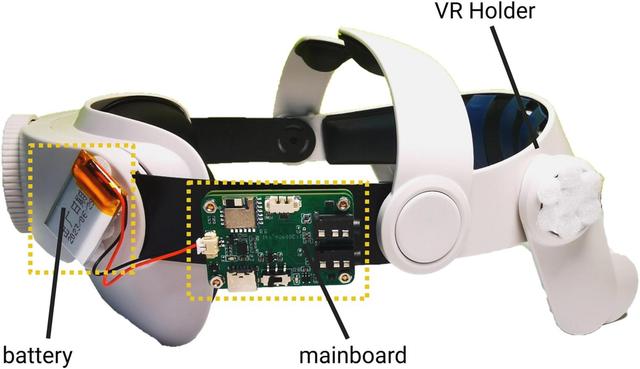
You can build a 60-dollar EEG that clips onto a VR headset and reads your brain
ScienceFor advanced builders
UP NEXT
A four-channel EEG that clips onto an Oculus Quest strap and sends brain signals over Bluetooth for the cost of a decent multimeter.
Also ScienceAlso Open-hardware
Open the next buildDISCLAIMER
- Comparee is not the author of the projects featured here. All rights to each project belong to its creator — every page links to the original source, and we never host creators’ files.
- Information is provided without warranty and may become outdated as projects evolve. Prices are indicative bands only — always check the creator’s parts list for current costs.
- Building and operating any project is at your own responsibility. Protective equipment, safe workshop practice and compliance with local regulations are the builder’s responsibility.
CompareeTEAM19h ago
Practical notes from our verification: the video shows a working setup but no build guide — antenna placement, gain settings, and clutter rejection all require tuning that the repo does not document. The single biggest unknown is whether you have a suitable transmitter nearby: without a strong FM, DAB, or DVB-T signal, the entire project is dead before you start. Check coverage maps first.