SO-ARM100: THE LOW-COST ROBOT ARM BEHIND HUGGINGFACE LEROBOT
An open-source teleoperated arm you can print and wire yourself — and the exact hardware HuggingFace uses to teach robots to learn.
by The Robot Studio (with HuggingFace)
RoboticsAI
- difficulty
- ●●●○○
- time
- a weekend
- license
- Apache-2.0
- repo
- repo ACTIVE6,900 stars
●●●○○ · a weekend · Apache-2.0 · 6,900 stars · repo ACTIVE
WHAT YOU’LL NEED
- 3D printer + filament — printable parts — files are in the repo
- Electronic parts — full list with part numbers in the repo BOM
- Dev board / microcontroller — runs the project firmware
- Soldering kit + basic tools — one-time buy, serves every future build
Partner
COMPAREE VERDICT
This is the one we'd point a beginner at first. SO-ARM100 (and its cleaner successor SO-101) is a genuinely printable, genuinely cheap robot arm with a real reason to exist: it's the reference hardware for HuggingFace's LeRobot, so building one plugs you straight into modern imitation-learning — teleoperate a leader arm, record demos, train a policy, watch the follower do it autonomously. The files are all there (STL, STEP, a BOM with regional links), the servos are cheap Feetech units, and there's a first-class HuggingFace tutorial video. If you've ever wanted to touch real robot learning without a lab, start here.
IN THE REPO
NOT IN THE REPO
- —Full STL + STEP in the repo, with variants for common printers
- —BOM includes regional buying links (US/EU/CN/JP)
- —Assembly guide is hosted on HuggingFace docs, not as a PDF in the repo
- —SO-101 is the newer, easier-to-build revision of SO-100
Can I build this?
Build at your own risk. Projects involve tools, electronics and sometimes mains voltage — follow the creator’s safety notes.
 Partner · Kickstarter
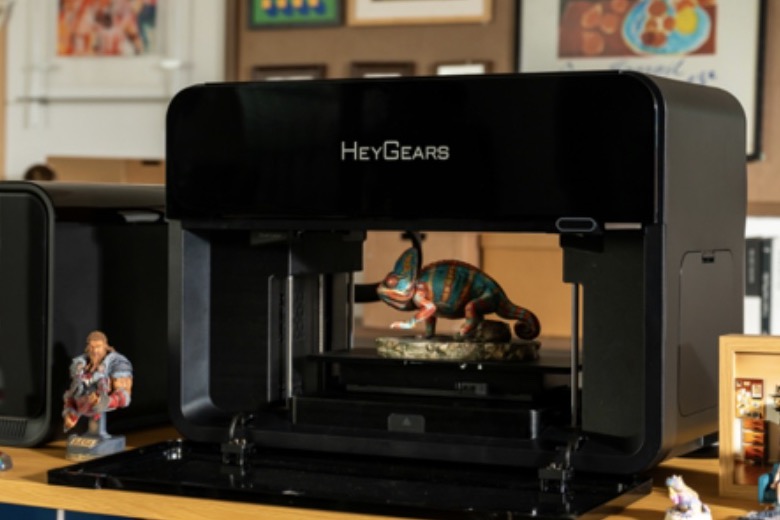
HeyGears G1: 10M+ colors and transparent parts in one print, plus UV printing on flat objects. Figures, parts and labels — no painting.
Videos
Assemble and Calibrate SO-100: LeRobot Tutorial #7 (Jess Moss)
Official HuggingFace assembly + calibration walkthrough, linked from the repo.
Gallery
Start here
Navigation into the creator’s own docs — we don’t rewrite the guide, we route you to the source.
- 1.Read the repo README (STL, STEP and BOM live here)
- 2.Follow the official assembly (SO-101 is the easier build)
- 3.Print the parts (printer-specific variants included)
- 4.Wire up LeRobot (teleop, record, train, run)
- 5.Join the LeRobot Discord (HuggingFace robotics community)
Resources
Documentation, files and community threads for this build — we link straight to the original sources and never rehost the creator’s files.
 Partner · Kickstarter
CORE POWER BANK S: 0.2" thin, 2.8 oz, 5000 mAh with 22.5W fast charging. Semi-solid battery, carbon fiber, IPX7 waterproof.
KNOWN ISSUES
- Build the SO-101 revision if you can — the leader wiring and gearing are much easier than the original SO-100
- The assembly guide is on HuggingFace docs, not a PDF in the repo — don't go looking for one
- It's a teleoperation-first arm — the magic is pairing a leader with a follower, so budget for two if you want the full LeRobot workflow
What can I actually do with it?
Teleoperate it, record demonstrations, and train a learned policy (ACT, Pi0, SmolVLA) so the arm repeats tasks on its own — the full modern imitation-learning loop, at home.
SO-100 or SO-101?
SO-101 is the newer revision: cleaner cabling, easier assembly, updated leader. Build that one unless you have a specific reason not to.
Do I need two arms?
For teleoperation-based learning, yes — a leader you move by hand and a follower that copies. You can start with a single follower for scripted motion.
What does it cost?
Band $$ — the servos are the main cost. The BOM has current regional prices.
Community builds
No community builds yet — be the first, we feature the best ones.
Discussion1
FROM THE COMPAREE TEAM
The full LeRobot workflow really wants two arms — a leader you move by hand and a follower that copies. Would you budget for the pair upfront, or start with one and hope?
ALOHA: The Stanford Robot That Learns From You
●●●●○ · the bimanual big brother of this teleoperation idea
Amazing Hand: A Fully 3D-Printed Robotic Hand
●●●○○ · add a dexterous printed hand to your arm
OpenArm: A Research-Grade Force-Feedback Robot Arm
●●●●● · a research-grade, force-feedback arm if you outgrow this
The Robot Studio (with HuggingFace)
Designed a low-cost open arm that became the reference hardware for HuggingFace LeRobot. SO-101 is their refined follow-up focused on easier building.
Keep building — related projects
Same category, picked by how close they are to this build.
 FULL CAD
3D print this robot arm, show it a task once, and it learns to repeat it
RoboticsAI●●●●○advanced
 FULL CAD
XLeRobot: A Household Robot on an IKEA Cart
RoboticsAI●●●●○advanced

 FULL CAD
You can 3D-print your own walking Star Wars BD-X droid - fully open-source
RoboticsAI●●●●●expert
 FULL CAD
OpenBot — turn a smartphone into a self-driving robot (3.4k stars)
RoboticsAI●●●○○moderate
DISCLAIMER
- Comparee is not the author of the projects featured here. All rights to each project belong to its creator — every page links to the original source, and we never host creators’ files.
- Information is provided without warranty and may become outdated as projects evolve. Prices are indicative bands only — always check the creator’s parts list for current costs.
- Building and operating any project is at your own responsibility. Protective equipment, safe workshop practice and compliance with local regulations are the builder’s responsibility.
CompareeTEAM1mo ago
Two practical findings from our read: the BOM thoughtfully includes regional buying links for the US, EU, China and Japan, and the consistent community advice is to build the newer SO-101 revision, whose leader wiring and gearing are much easier than the original SO-100. The assembly guide, we noticed, lives on HuggingFace docs rather than as a PDF in the repo. What tasks have your trained policies actually mastered?